
2026-04-14
If ingestors and processors give your RevOps strategy structure, responding to state gives it intelligence. Don’t build workflows that react to actions. Build workflows that respond to state.

The Architectural Patterns That Make Revenue Systems Modular, Consistent, and Future-Proof
We introduced design thinking as the framework for how to approach CRM architecture, and the Waterfall Principle as the first test of whether a system is well-designed. That foundation is essential to any serious RevOps strategy. If you pour water through your HubSpot workflow, does it flow continuously from top to bottom? Or does it pool in gaps, hoping some other workflow picks it up?

The waterfall tells you whether your system flows. But it doesn’t tell you whether your system consistently accepts and transforms what passes through it. Water flowing through pipes is passive. Gravity moves it, but nothing intentional happens along the way. The data enters, the data exits, and whatever happens in between is whatever someone happened to build.
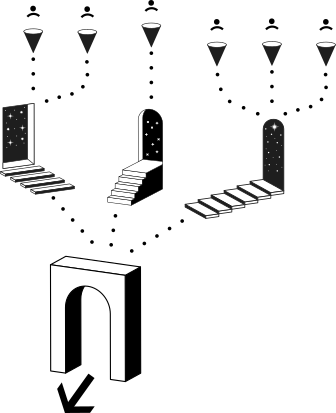
Change it once, centrally, and it applies universally.
Think about an international airport. Flights arrive from dozens of different cities and countries, on different airlines. Every flight has its own origin, its own context, its own passenger manifest. Each passenger has their own boarding pass unique to their origin and destination. They’ve even made a choice about which exact seat they sat in on the plane.
But every single passenger, regardless of where they came from, passes through the same customs checkpoint before they enter the country.
The passport is checked, and status is assigned: cleared, flagged, or routed. The process is consistent and repeatable. It doesn’t matter if you flew in from Tokyo or Toronto. Customs treats you the same way.
And here’s the detail that matters most: if the government changes the customs rules, they change them at the checkpoint – in one place. Every passenger processed after that moment is handled under the new rules. It doesn’t matter which flight they arrived on. They don’t go to every airline check-in desk at every origin city and update the process there. They change it once, centrally, and it applies universally.
That’s the pattern we’re after and it maps directly to how revenue systems should be built.
At any point, you can add a new flight to the airport. But every new flight still funnels through the same customs. That’s what makes the system scalable without becoming chaotic.
The ingestor is the first entry point to your system. It receives a specific source of input and does what only that source needs before passing the contact to the shared system. Understanding ingestors is a foundational piece of a mature RevOps strategy.
The flight is the external event. The gate process is yours. You designed it.
In CRM terms, an ingestor accepts a specific input, performs source-specific actions, and then pushes the contact to your central processors. The source-specific actions might include tagging the date, stamping the conversion point, sending a confirmation email unique to that source, or checking whether a follow-up action has been completed.
The form is the thing that happens. The ingestor is what you build to handle it. Those are two different things, and the distinction matters. Many builders treat the form submission as the workflow. But the form is just the trigger. The ingestor is the designed response to that trigger: the intentional set of actions that processes this specific type of input before it enters the shared system.
You will have many ingestors, because you have many sources entering your system. Multiple flights into the airport. And you should very clearly know every single one of them.
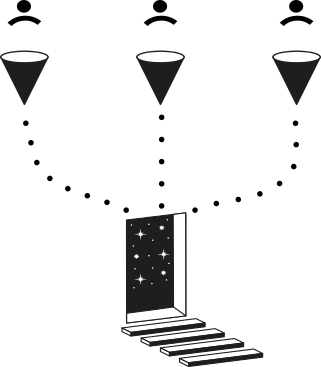
You run an event and import attendees afterward. That ingestor needs to tag the source (which event, what date), and send event-specific follow-up emails (“Thanks for attending, here’s what’s next”). A webinar through a tool integration works the same way, but the trigger and the specific emails are different. A demo request form might need to check whether the person should be filtered out, then see if they booked a meeting or not, and branch accordingly. A gated content form needs to deliver the specific asset they requested.
Each of these is an ingestor. Each one handles what’s unique to its source. And each one, after it’s done with its source-specific work, pushes to the same central processors for enrichment, lead source tagging, territory assignment, and routing.
The principle is clean separation of concerns: the ingestor handles the unique, the processor handles the universal.
To make these patterns concrete, I want to trace a single real-world example across all three principles in this piece. We recently built an outbound program for a client using three tools: Unify for cold email sequencing, Orum for power dialing, and HubSpot as the CRM. Three systems, one contact. Multiple HubSpot workflows working in concert.
The ingestors in this system are the entry points where contacts first enter the outbound motion. When a list of prospects gets enrolled in a Unify email sequence, that’s an ingestor: it creates a lead record, tags the source as outbound, and stamps the enrollment date. When a meeting is booked through a meeting link, that’s a different ingestor: it checks whether the meeting was held, and handles the follow-up accordingly. When a contact arrives through an inbound round robin, that’s yet another ingestor with its own source-specific logic.
Each one handles what’s unique to its entry point. Then each one pushes to the shared processors.
You’re going to accumulate a lot of ingestors. This is normal and healthy. But you need to keep them organized.
Build a spreadsheet that tracks every ingestor: the trigger (form, import, integration, meeting link), a link to the workflow, the lead source bucket it maps to, the conversion type, and any UTM parameters. This becomes your go-to reference for understanding every entry point in your system. When you catalog your HubSpot workflows this way, you create a living map of your entire intake architecture.
It’s also a forcing function. When you have to document each ingestor, you’re forced to define things like source categorization and UTM conventions consistently upfront. You can’t just add another form workflow without thinking about where it fits in the system.
If you can’t list every ingestor in your system, you don’t fully know your own system. And if you don’t know your own system, you can’t architect it.
The processor is the customs checkpoint. The gateway. Everyone must funnel through it, and there is consistency and repeatability in what happens there.
There are two reasons to build a processor. First, consistency of transformation: shared logic that should apply to everyone regardless of how they entered the system. Second, consolidation of repeated logic: when multiple workflows need to do the same thing, you build it once and route everything to it. Instead of the same logic duplicated in six places, there’s one place. And when you need to change it, you change it once.
I think of processors in two categories.

A Gateway processor is one that everything must pass through. This is customs itself. No exceptions. Gateway processors are integral to your RevOps strategy, because they enforce consistency at the system level rather than relying on individual workflow discipline.
It’s where you handle the things that should happen consistently every time, for every contact entering your system. Tagging lead source. Assigning territory. Marking marketing contact status. Creating leads. These are the universal processes that don’t depend on which ingestor sent the contact. They depend on the contact being in the system at all.
Lead source tagging is the clearest example, and it illustrates why ingestors alone can’t do the whole job.
A form may be the entry point, but the contact could have come from paid, organic, or referral depending on UTM parameters. Lead source isn’t the entry event. It’s context that needs to be interpreted.
An event import is straightforward: you know the source, you tag it directly. But a demo request form could be paid social, organic search, or a partner referral depending on what the UTMs say. If the UTM contains ‘paid social,’ it’s paid. If it contains ‘partner,’ it’s a referral. If there’s no UTM at all, it’s organic.
If we add a new lead source category, we add it once. If we change how we interpret UTMs, we change it once. Every ingestor just pushes to this processor and it handles the rest. This is where the real leverage of centralized HubSpot workflows becomes obvious.
When I showed this pattern to a client, they said, “I’ve been building this into every form workflow separately.” That’s exactly the problem this solves. Every time they added a new form, they were copying and modifying the lead source logic. Which meant every form had a slightly different version of it. Which meant their data was inconsistent. Which meant their reports couldn’t be trusted.

A Utility processor is a reusable function. Not everything must funnel through it, but when you need it, it’s there, and it works the same way every time. Think of it as a centrally managed template—one of those HubSpot workflows that exists to be called by others, not to run on its own schedule.
Enrichment is a clear example. We build webhooks that connect HubSpot to a Clay table for general enrichment: title, LinkedIn profile, annual revenue, company size. It’s a single workflow that any ingestor can call. If at any point we want to add a new data point (say, industry), we update it in one Clay table that one workflow references. Done. Every contact enriched after that change gets the new field.
We build a separate utility processor specifically for phone number enrichment. Phone data is significantly more expensive, so not every flow needs it. By keeping it as a distinct processor, we can decide per-ingestor whether to route contacts through general enrichment only, or through both general and phone enrichment. It’s modular. It’s cost-conscious. And it’s centrally managed.
Other processors we commonly build: routing workflows (assign leads to reps by territory in one place, not scattered across every ingestor), lead creation workflows (create the lead record, copy source data from the contact, associate to the right company), marketing contact tagging, and centralized Slack alerts.
That last one is worth a moment. How many of you know where every single Slack alert fires in your system? For most teams, it’s scattered. A Slack notification in this workflow, another in that one, each slightly different, each hard to find when you need to update the channel or the message format. If you can funnel notifications through a central Slack alert processor that reads the lead source and owner dynamically, you update Slack notifications in one place, not twenty. The pattern holds across all of your HubSpot workflows: centralize what’s shared, and the whole system gets easier to manage.
In our outbound program, the processors do the heavy lifting after the ingestors accept their inputs. A routing processor assigns leads to reps by territory. A lead creation processor creates the lead record, copies source data from the contact, and associates it with the appropriate company. A Slack alert processor sends a standardized notification with the lead source and assigned owner. All of these are shared HubSpot workflows that every ingestor feeds into.
Each ingestor, whether it’s a Unify sequence enrollment, a meeting booked, or an inbound round robin, pushes to these same processors. The ingestors handle what’s unique. The processors handle what’s universal. And when something changes (a new territory, a different Slack channel, an updated enrichment field), it changes in one place.
The diagnostic question to carry with you: are there main places you go to change how your system behaves? If not, your logic is scattered. And scattered logic is logic you can’t trust.
The principle is clean separation of concerns: the ingestor handles the unique, the processor handles the universal.
Everything communicates to the state. Everything listens to the state. Triggers go up. Actions flow down. The state sits in the middle and orchestrates.
This is the final architectural layer, and I believe it’s the most important one. This is where the system stops being a collection of workflows and starts becoming something that knows itself. If ingestors and processors give your RevOps strategy structure, responding to state gives it intelligence.

Most people build HubSpot workflows that say, “if this action happens, do that thing.” A call connects, so remove them from the email sequence. A meeting is booked, so create a deal. An email bounces, so opt them out of the dialer. Each trigger connects directly to its downstream action.
On paper, each one makes sense. But zoom out and you’ve got a spaghetti of wires. Eight triggers crossing to six actions, with overlapping connections going in every direction. It’s hard to keep track of what does what. When something doesn’t work as intended, troubleshooting means tracing wires through a tangle you can barely see. And when you need to add a new trigger or a new action, you’re adding more wires to an already overloaded board.
This is how most systems are built. And it’s why most systems feel fragile.
What if, instead of connecting triggers directly to actions, you introduced a middle layers.
The model works in three tiers. Triggers are signals received: an outbound call was made, an email response came in, a meeting was booked, a contact was marked do-not-contact. These signals don’t directly fire downstream actions. Instead, your HubSpot workflows update a central state field.
The state is the source of truth. It’s where the contact sits on a defined spectrum. In our outbound example, the Lead Stage has five positions: New, Attempting, Connected, Qualified, Disqualified. Every contact is always somewhere on this spectrum, and the system always knows where.
Actions respond to the state. When a lead moves to Connected, the system removes them from the email sequence, opts them out of the dialer, and sends a Slack notification. It doesn’t matter what triggered the state change. A good phone call, an inbound email reply, a meeting booked through a link. All of those different signals move the state to Connected, and Connected always means the same set of downstream actions.
Everything communicates to the state. Everything listens to the state. Triggers go up. Actions flow down. The state sits in the middle and orchestrates.

Let’s bring the entire outbound program together. Three tools: Unify for cold email, Orum for dialing, HubSpot as the CRM. Three systems, one contact. One state. This is RevOps strategy made tangible.
When a contact is enrolled in a Unify sequence (that’s an ingestor), the lead is created and the Lead Stage is set to Attempting. Because the stage is Attempting, the contact automatically appears on the rep’s dial list in Orum. The rep doesn’t touch a single task. They just load their list each morning: show me everyone in Attempting. Go.
If Unify detects an email response, the Lead Stage moves to Connected. Because it’s now Connected, the contact drops off the dial list automatically. The rep doesn’t have to cancel anything or update any records. The system knows where the contact is and adjusts accordingly. The rep just needs to go read the email and decide what to do next.
If a rep makes a call and the person says “don’t call me again,” the rep marks the call disposition as DO NOT CONTACT, then the lead is auto Disqualified. That single state change triggers a cascade: the lead is closed, the contact is removed from the email sequence in Unify, and they’re taken off the dial list in Orum. One action by the rep. The system handles everything else.
Now compare this to the alternative. In a task-based system, when someone gets disqualified, you need separate HubSpot workflows to cancel each task, remove from each sequence, and update each tool. And if a task was already created for tomorrow’s call? Good luck. Tasks in HubSpot are notoriously difficult to clean up retroactively.
I asked, “You think this is better? You think anyone is staying on top of this?” Nobody is. The task model collapses at scale. State doesn’t.
Here’s where the architecture really pays off.
We built this entire outbound system for the client. Cold emails through Unify, calls through Orum, everything responding to state in HubSpot. Then the email tool didn’t work out. The client’s security team flagged compliance concerns. They needed to switch to a different sequencer.
In a task-based, tool-coupled system, that’s a rebuild, which means weeks of work creating new workflows, new logic, new connections.
For us? We pulled out the old tool, plugged in the new one, pointed it at the same Lead Stage field, and it worked. Yellow Lego brick instead of a red one. The system didn’t care which tool was sending the emails. It cared about the state. And the state hadn’t changed. That’s what a sound RevOps strategy produces: systems where the tools are interchangeable and the architecture holds.
It doesn’t need to be told what to do in every scenario. It reads its own state and responds accordingly. That’s the airport after everyone’s cleared customs. The system knows who you are, where you came from, and what should happen next. You don’t have to tell it.
Across both parts of this series, we’ve moved from philosophy to practice. From the mindset shift (fixer to architect, building to designing) through the foundational principle (the waterfall) to the architectural patterns themselves (ingestors, processors, state). The question worth asking is: why does any of this matter beyond the elegance of a well-built system?
Because architecture produces outcomes that matter to everyone in the organization.
When every lead source is tagged through the same processor, when every status is assigned through the same logic, when every field is populated through a central workflow, your reports are trustworthy. Leadership can make decisions based on data that actually reflects reality. If all the leads are coming from events and none from SEO, you know where to invest. But only if the data is consistent—and consistency is what well-architected HubSpot workflows deliver.
When the system responds to state, the customer has a predictable experience. They get the right email at the right time. They don’t get called after they’ve already been qualified. They don’t fall through cracks between teams. In our outbound example, if someone says “kick rocks” and then gets another cold email the next day, that’s a broken experience. State-based architecture prevents that.
What if you suddenly have a new product line? A new market? A new channel? Are you going to build eighteen new form-triggered HubSpot workflows that each repeat the same logic? Or are you going to plug new ingestors into existing processors? Architecture is what lets you grow without rebuilding from scratch every time something changes.
The speed at which a business can change is directly related to the quality of its systems. Systems break. They’re meant to, because breaking is how they grow. But a system designed with architecture can break in visible, fixable ways. You know where to look. You know what to change. That adaptability is the ultimate return on a well-executed RevOps strategy. Auditable, because you can see what it does, maintainable, because you can change it without fear and teachable, because anyone can learn it from the map.

We started this series with a question:
Now you have four ways to answer that.
One:
If you poured water through your system right now, where would it stop? That’s the waterfall. It tells you whether your HubSpot workflows actually flow.
Two:
Can you name every entry point in your system? Those are your ingestors. They tell you whether your system knows what’s coming in.
Three:
Are there main places you go to change how your system behaves? Those are your processors. They tell you whether your system transforms data consistently.
Four:
Does your system respond to where things are, not just what happened? That’s state. It tells you whether your system knows itself.
That’s when your RevOps strategy stops being a plan and starts being a system.
But these are just tools. The real shift is deeper. If you’re in a RevOps role, or even an admin role, you’re not there to fix what breaks. That’s part of the job, sure. But your real purpose is to design the system that everyone else works inside of. That’s architecture. That’s the work that compounds.
And if nobody gave you that mandate, take it anyway. Because if you don’t design the building, nobody will.
David Askvig is a Managing Partner at Levver, a Go-to-Market and Revenue Operations consultancy and HubSpot Platinum Partner. He is the firm's CRM architect and spends most of his time inside complex HubSpot instances designing revenue systems that scale.
This is a Textbook entry. Practical, grounded, designed to be referenced and reused. Part 2 of The Architect’s Mindset series.
Architecture produces outcomes that matter to everyone in the organization.

In moments of expansion